Plan, lift, log
Plan it. Do it. Keep it.
The workout you planned: build it, follow it set by set, and keep what you actually did.
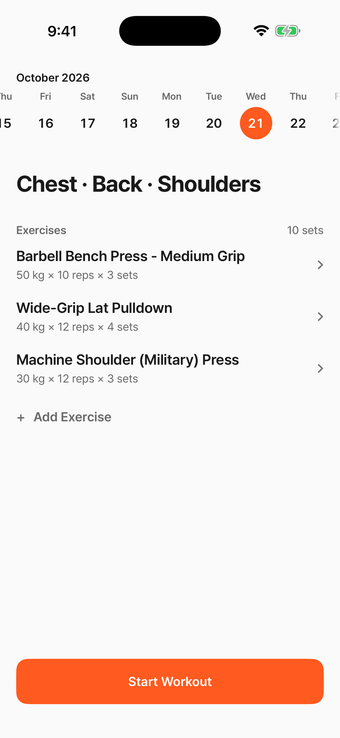
Your plan, your numbers, and nothing in between.
Set 1 / 3
Start from where you are.
In ProgressNo more writing sets in a notes app. Pick a routine, set your targets, and today's plan is done.
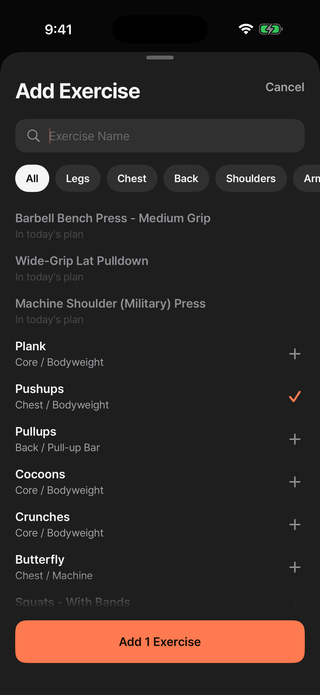
- 1
Pick exercises
Search by name or filter by body part, then add them to today's plan.
- 2
Set targets
Reps, time, or distance, whichever fits the exercise.
- 3
Set rest
Choose how long you rest between sets for each exercise.
Set 2 / 3
Just the next set.
In ProgressYour current target fills the screen, and rest counts down on its own, so there's no stopwatch to keep.
Readable mid-set
The target is the biggest thing on screen. What's next waits in one quiet line.
Rest counts down
From the rest you planned. Ten seconds more or less, as you go.
Rest alerts
A notification when rest is over, even with the phone locked.
Set 3 / 3
Keep what you did.
CompletedEvery set you complete is saved with the values you actually did, so there's nothing to piece together later.
- Real values, not the planNine reps is kept as nine. A heavier bar is kept as heavier.
- Fix it laterGot a number wrong? Change it from the summary and the record follows.
- Any day, back to the summaryPick a past day and it's right there.
Thursday, October 15
11 / 11 sets42 minBarbell Bench Press - Medium Grip
3 / 3 sets- 1 50kg× 10reps
- 2 was 50 kg, now 52.5kg× 10reps
- 3 52.5kg× 9reps
Wide-Grip Lat Pulldown
3 / 3 sets- 1 40kg× 12reps
- 2 40kg× 12reps
- 3 40kg× 11reps
Machine Shoulder (Military) Press
3 / 3 sets- 1 30kg× 12reps
- 2 30kg× 12reps
- 3 30kg× 10reps
Plank
2 / 2 sets- 1 45s
- 2 45s
Privacy
Yours. On your phone.
There's no account and no server. Theo only sends anonymous usage statistics and crash reports, never your exercises or the values you enter.
- 0 accounts No sign-up
- On-device Your data
- Offline Works anywhere
Maker
Built by one person who needed it.
I started working out again after a long time off. With a job and a toddler at home, the only window I had was about 40 minutes before work. It wasn't much, but I already knew what I wanted to do each day, so I figured that was enough.
It turned out the workout was the easy part. After every set I'd stop to write down the weight and reps, set a timer for the rest, and sometimes check what I'd lifted last time. With only 40 minutes, the bookkeeping started to feel like the workout itself.
Eventually I asked myself why I was doing any of it by hand. The plan was already written. What if the app just showed me what was next, and finishing a set was one tap, with the numbers saved and the rest timer running on its own?
That was really all I needed. Nothing to think about but the lift while I'm lifting, and an honest record waiting when I'm done. That's where Theo came from.
Hoon Oh
Questions
Is there a subscription?
No. There's no subscription and no account.
Do I need an account?
No. Open the app and start planning. Your plans and workouts are stored only on your iPhone, and deleting the app deletes them too.
Is Theo only for iPhone?
Yes. It runs on iPhone with iOS 18 or later. There's no Android or Apple Watch version.
What if I leave the app mid-workout?
Your workout is right where you left it, even if the app closes. You can also pause and pick it up later.
Can I export my workouts?
Not at the moment. There's no export feature.
Workout Complete